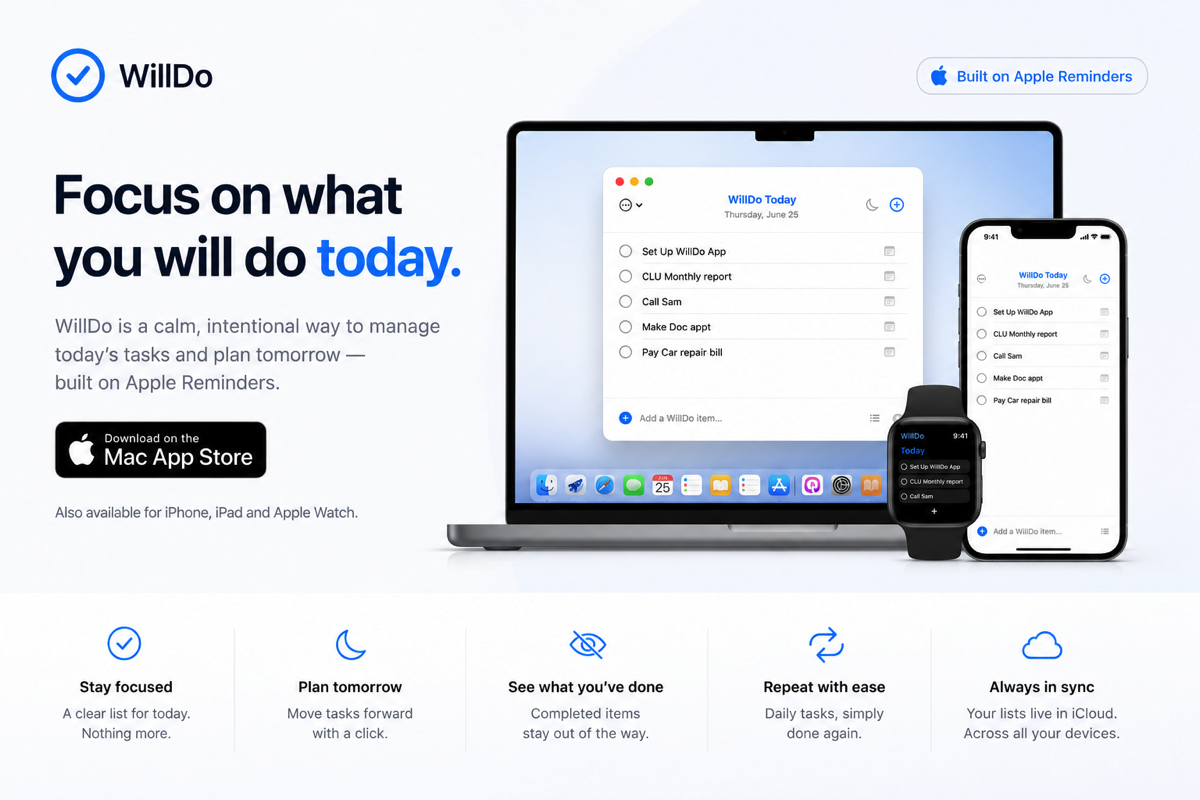
Start each day with intention, not overwhelm.
Most to-do apps encourage you to collect more. More tasks. More projects. More lists. WillDo begins with a different question: what will you actually do today?
WillDo is a deliberately simple daily list for Mac, iPhone, iPad and Apple Watch, built on Apple Reminders and synced through your own iCloud account.
Choose Today. Plan Tomorrow. Look back through your History when it helps. No account. No subscription. No tracking. Just your day, in one focused list.
Syncs via
iCloud
Your Today, Tomorrow and History stay in sync across your own Apple devices.
Built on
Reminders
Your tasks remain ordinary Apple Reminders, never trapped inside another app.
Simple by
design
Today. Tomorrow. History. Everything you need. Nothing you don't.
Apple
Watch
See what's left at a glance, then complete, postpone or delete tasks from your wrist.
Private by
default
No accounts. No analytics. No advertising. No tracking. Your data stays with Apple.
Most of us do not have a shortage of things to do. We have the opposite problem.
Lists grow. Projects multiply. Little tasks gather like dust. Open the wrong app first thing in the morning and the day can feel crowded before it has even begun.
WillDo is built around a different rhythm.
Each morning, choose what you genuinely intend to complete today. Put what matters next into Tomorrow. Everything else can wait its turn.
This is not about doing more. It is about choosing more honestly.
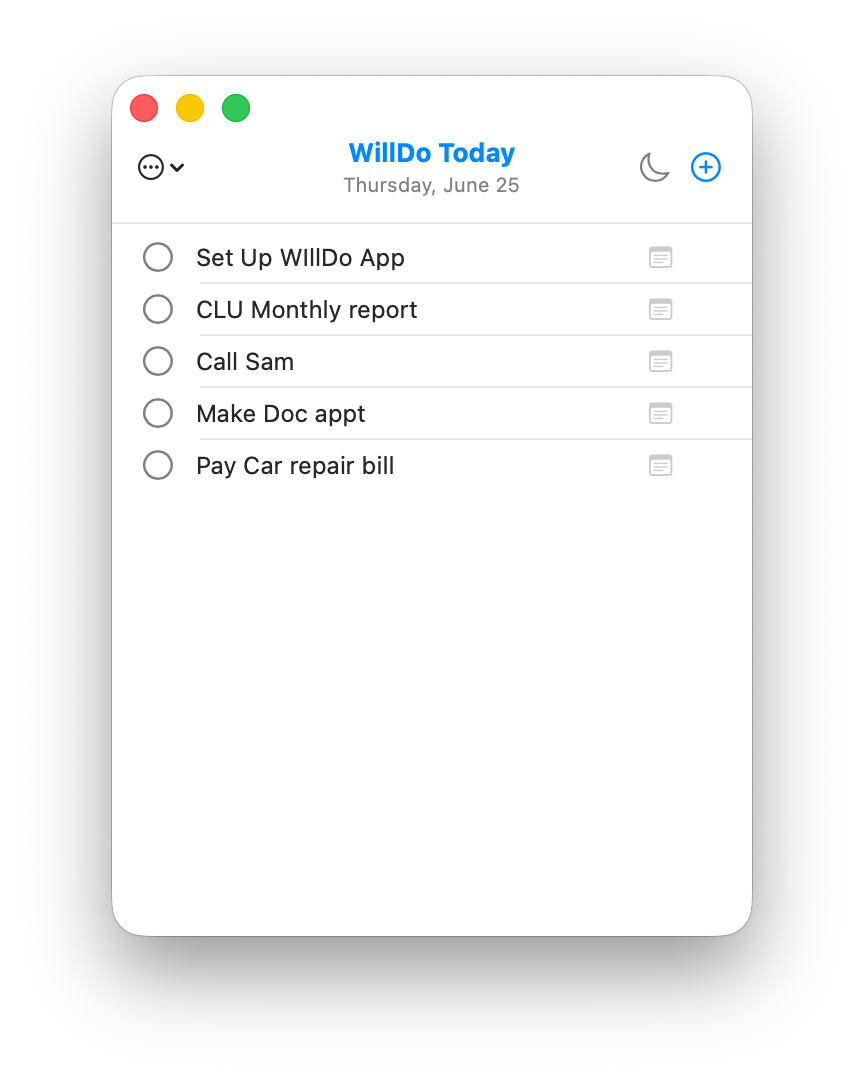
Everything you need. Nothing you do not.
Today and Tomorrow
Choose today's focus, then place what comes next into Tomorrow. Each new day, Tomorrow becomes Today, while completed tasks are quietly recorded in your History.
Built on Apple Reminders
Your tasks live in Apple Reminders and sync through your own iCloud account. No new account. No lock-in.
History
Browse, search, share or save your history, then quickly add completed tasks back to Today or Tomorrow whenever they're useful again.
Apple Watch
See what's left at a glance, then complete, postpone or delete tasks directly from your wrist.
Widgets
Keep Today visible on your Mac desktop, iPhone Home Screen or iPad without opening the app.
Siri and Shortcuts
Add tasks with Siri, Apple Shortcuts or the built-in WillDo action, including sending tasks directly to Today or Tomorrow.
Notes
Add notes whenever a task needs a little more context, without cluttering your list.
Private
No accounts. No analytics. No advertising. No tracking. Your tasks stay in Apple Reminders and your own iCloud account.
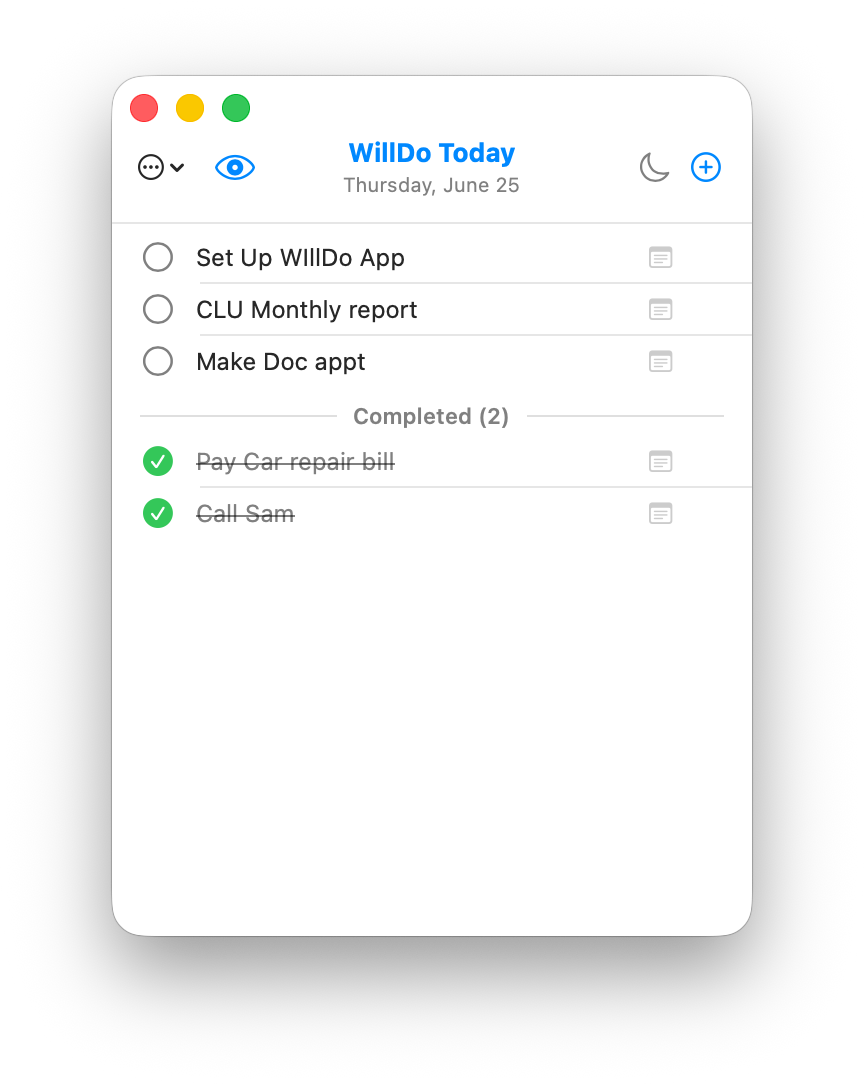
In the Menu on Your Mac
A small menu-bar app that stays close without taking over your desktop.
Always There. Never In The Way.
One click from your Mac's menu bar.
Your Today list is always within reach, whether you need to add a task, check what's next, or celebrate what you've already completed.
No searching through windows.
No launching another app.
Just a quick glance whenever you need it, then back to whatever you were doing.
It is one of those little things that is difficult to appreciate until you've lived with it for a few days. Once you have, it is surprisingly hard to imagine working any other way.
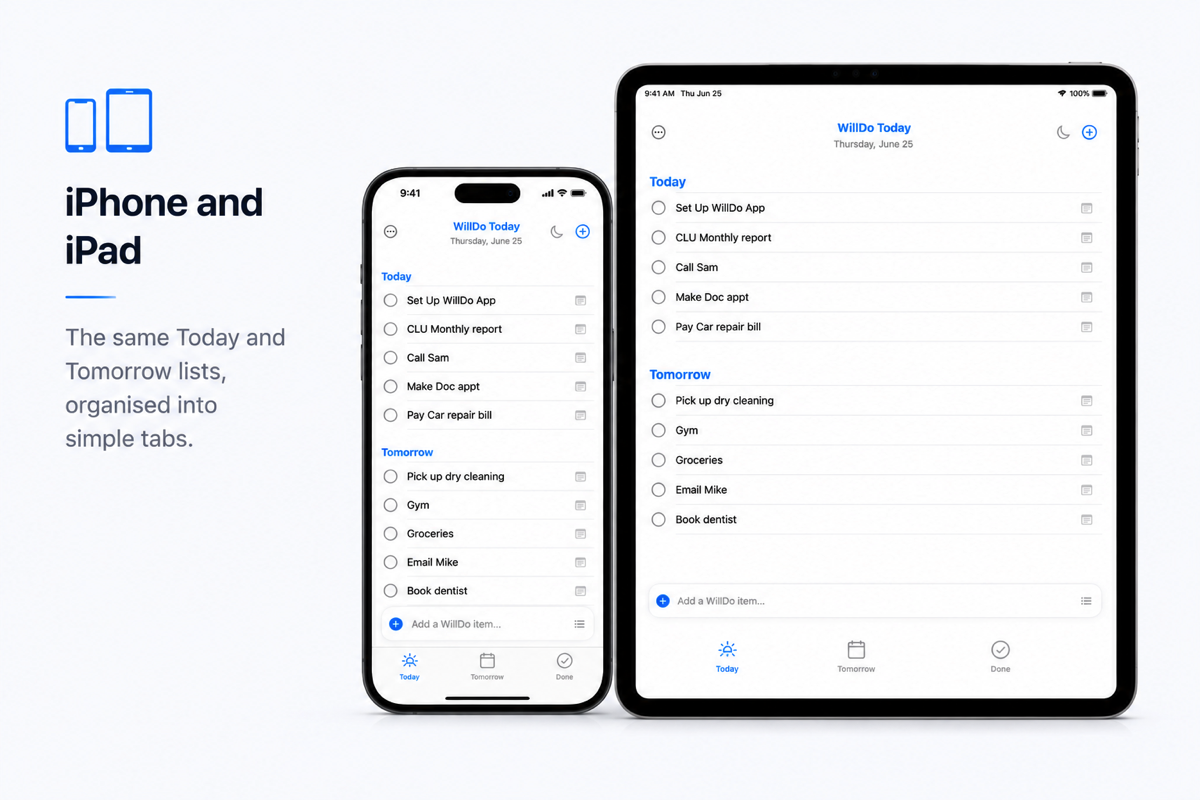
iPhone and iPad
The same Today, Tomorrow and History you know from your Mac, thoughtfully designed for iPhone and iPad.
Simple tabs. Familiar swipe actions. Widgets, Siri and Apple Shortcuts. Everything stays in sync through your own iCloud account.
Whether you're planning your day, checking something off on the move, or capturing a task before you forget it, WillDo is always ready without getting in your way.
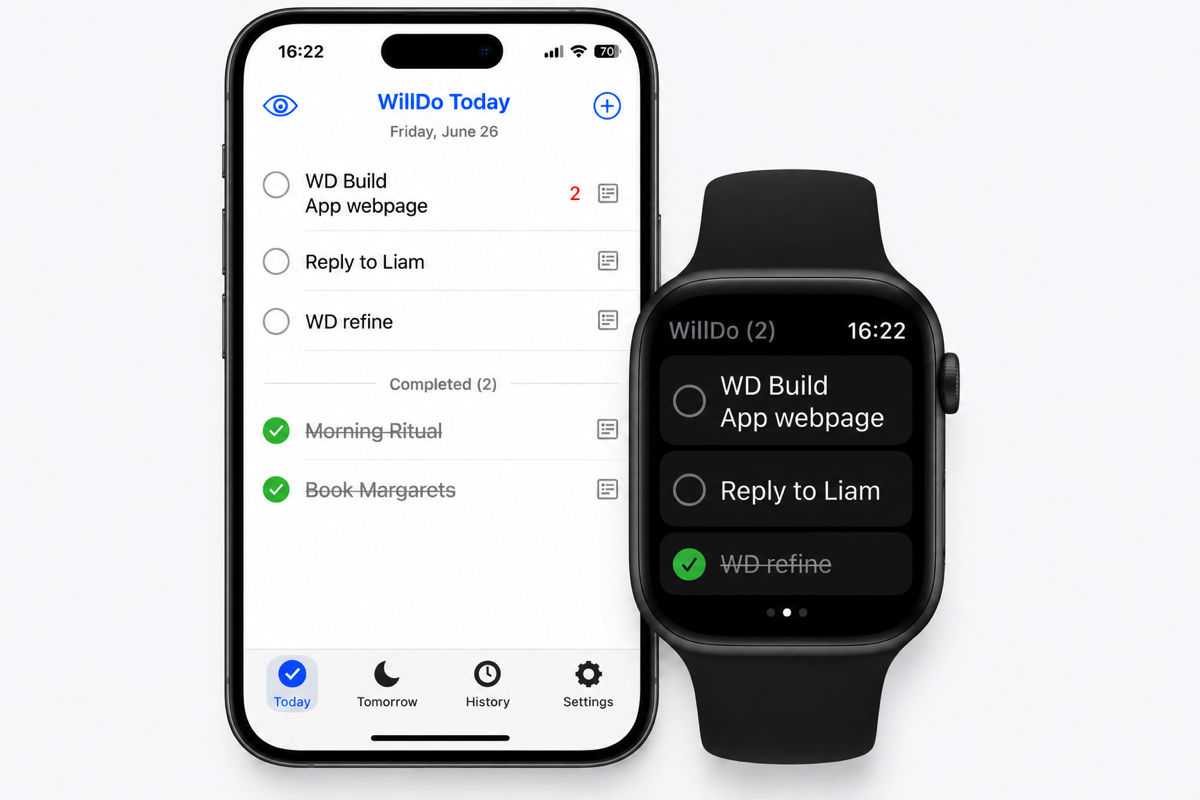
Apple Watch
Your Today list on your wrist, with what's left visible at a glance.
Complete tasks, postpone them until Tomorrow or delete them without reaching for your phone.
Whether you're walking the dog, making a coffee or between meetings, your list is always just a glance away.
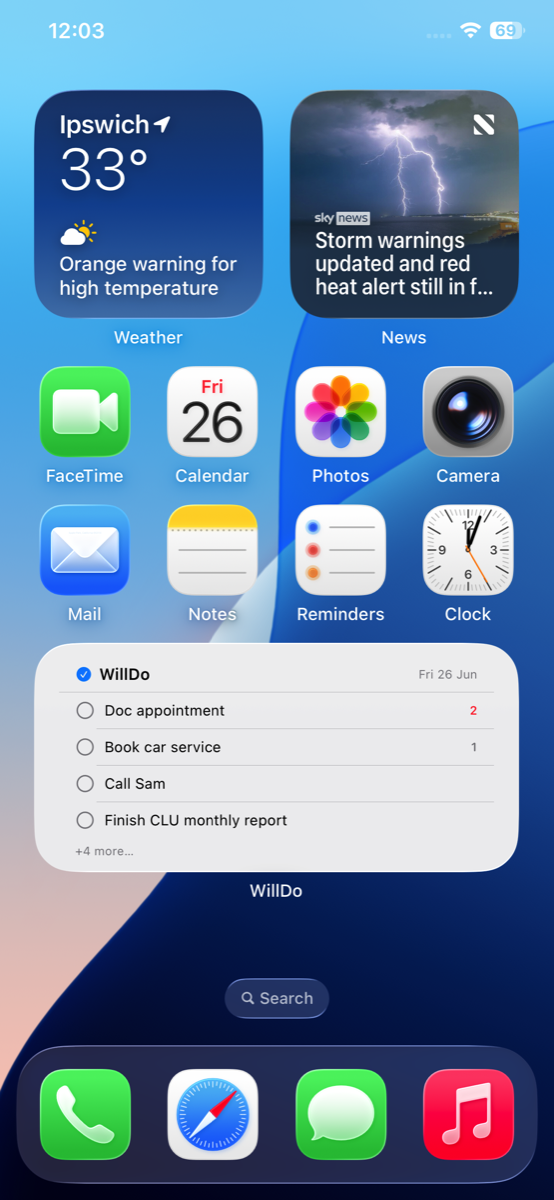
Widgets
Keep your Today list visible without opening the app.
Whether it's on your iPhone Home Screen, iPad or Mac desktop, your next few tasks are always just a glance away.
A gentle reminder of what you've chosen to do today, without another app demanding your attention.
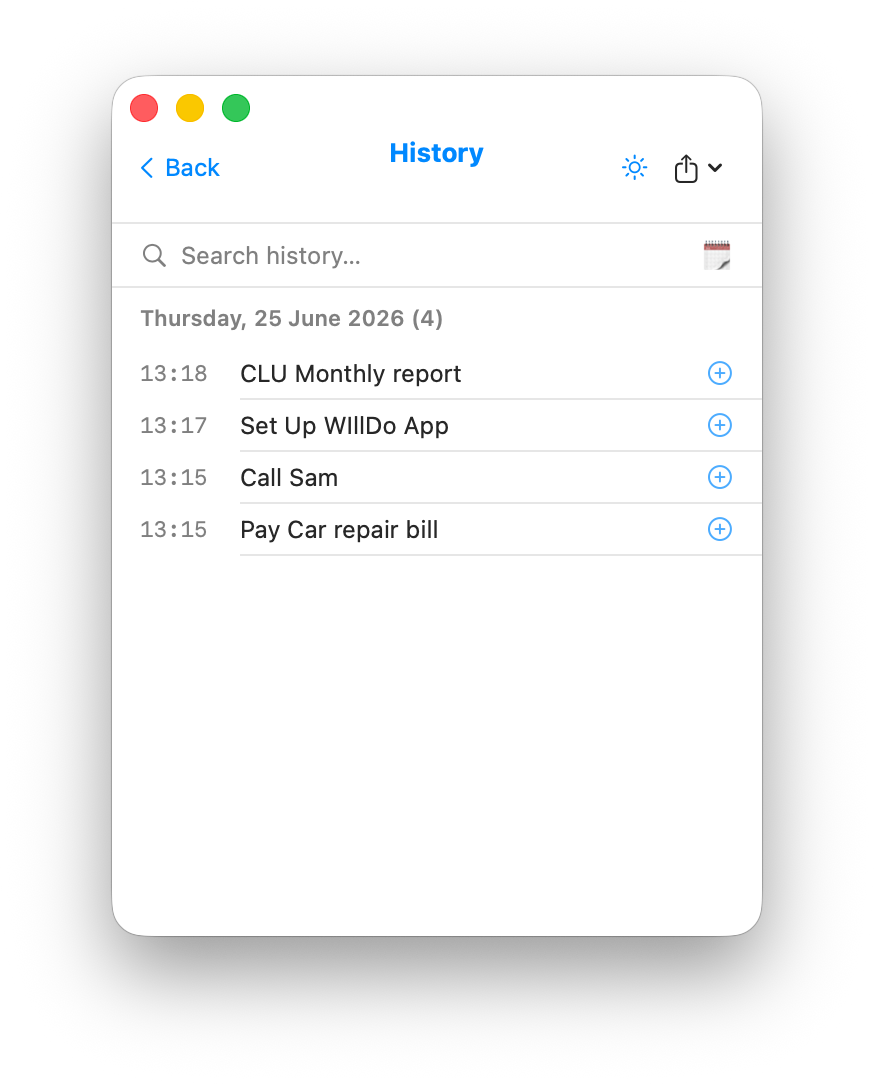
History
A complete record of what you've accomplished, organised by day and always easy to find.
Search your history, quickly add completed tasks back to Today or Tomorrow, and share or save your progress as Text or PDF whenever you want.
History helps you remember what you've achieved, revisit tasks that return from time to time, and appreciate just how much you've actually done.
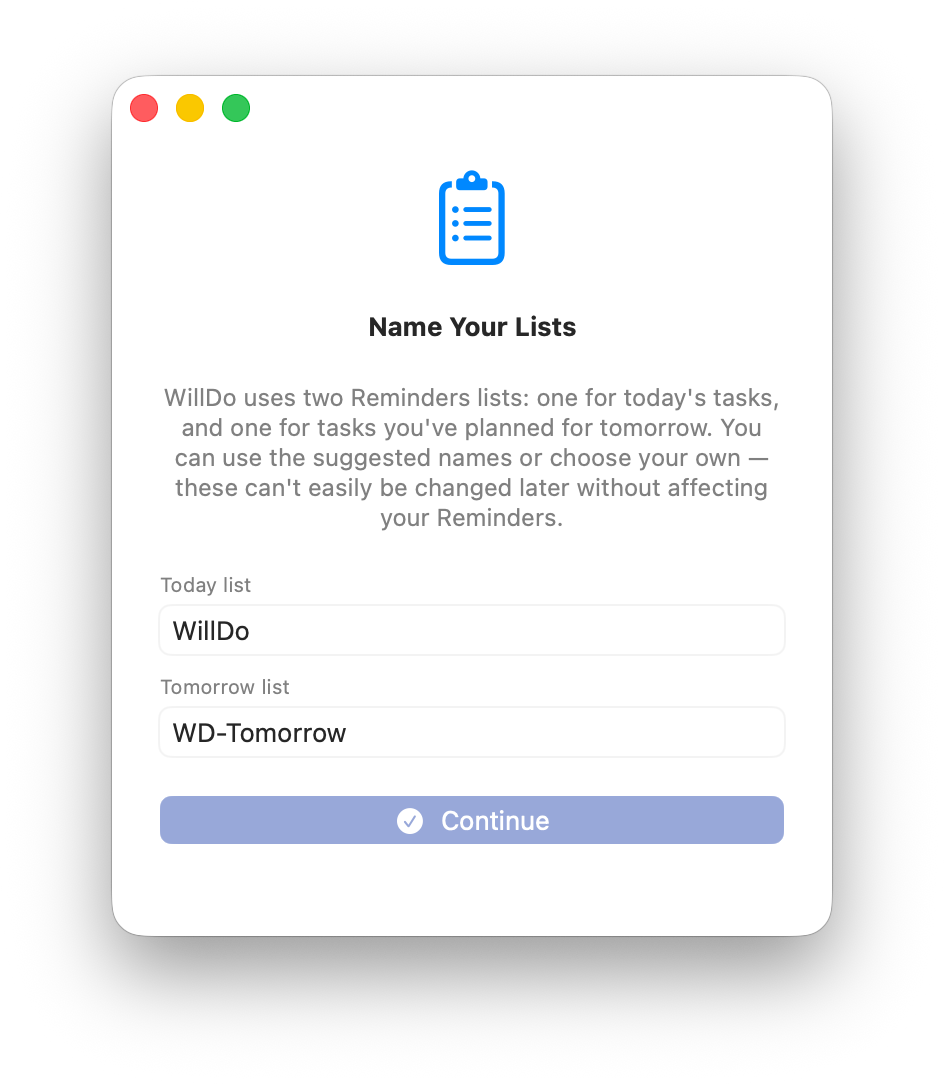
Getting Started
Set up WillDo in just a few moments by choosing the Apple Reminders lists you want to use for Today and Tomorrow.
If you have already configured WillDo on another device, your settings can be picked up automatically through iCloud, making it easy to get started on Mac, iPhone, iPad and Apple Watch.
Your tasks stay in Apple Reminders, sync through your own iCloud account, and remain available outside WillDo too.
Today
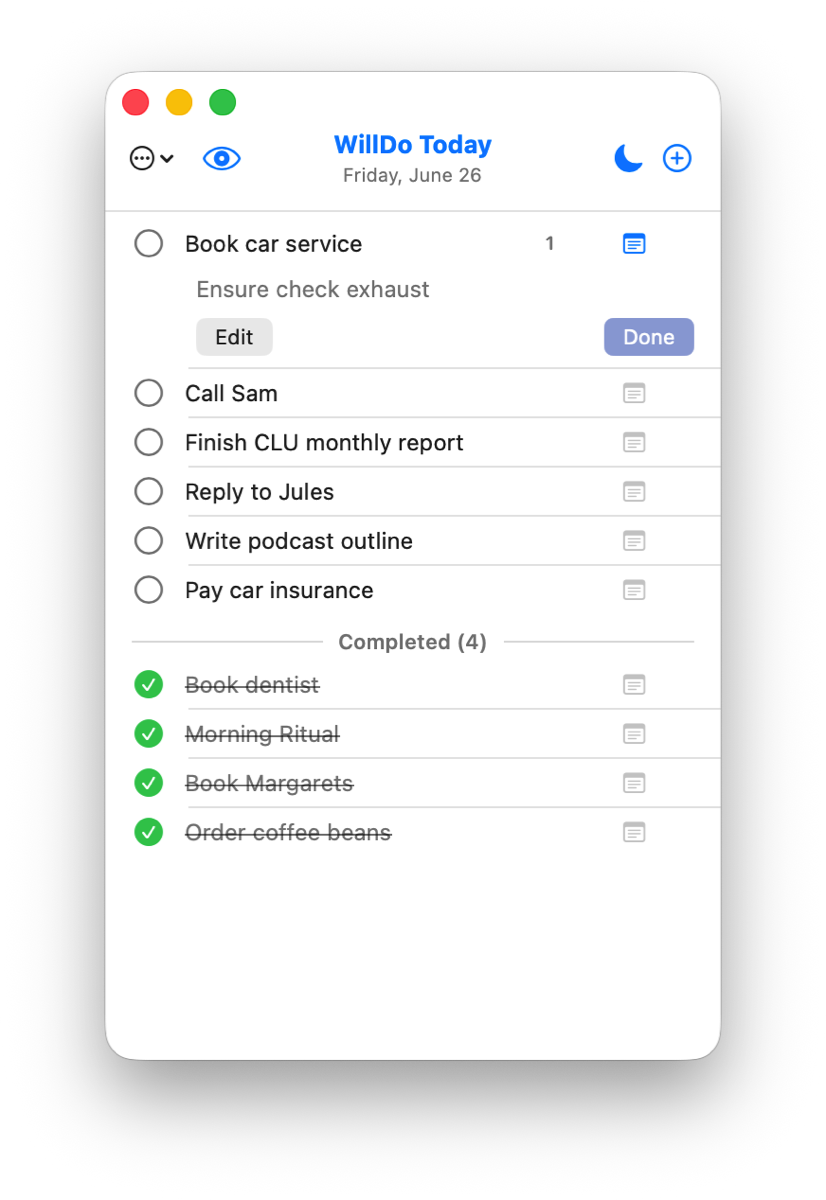
Today is the heart of WillDo.
Choose only what you genuinely intend to complete today. Add new tasks, edit them in place, reorder them, attach notes, and complete them with a single click or tap.
Completed tasks can remain visible or disappear automatically, depending on your preference. You can also show task age and task counts when they're useful, while keeping your list as clean or as detailed as you like.
Anything you don't finish remains safely in Today until you're ready. Completed tasks are quietly added to your History, ready to search, revisit or re-add whenever you need them.
Tomorrow
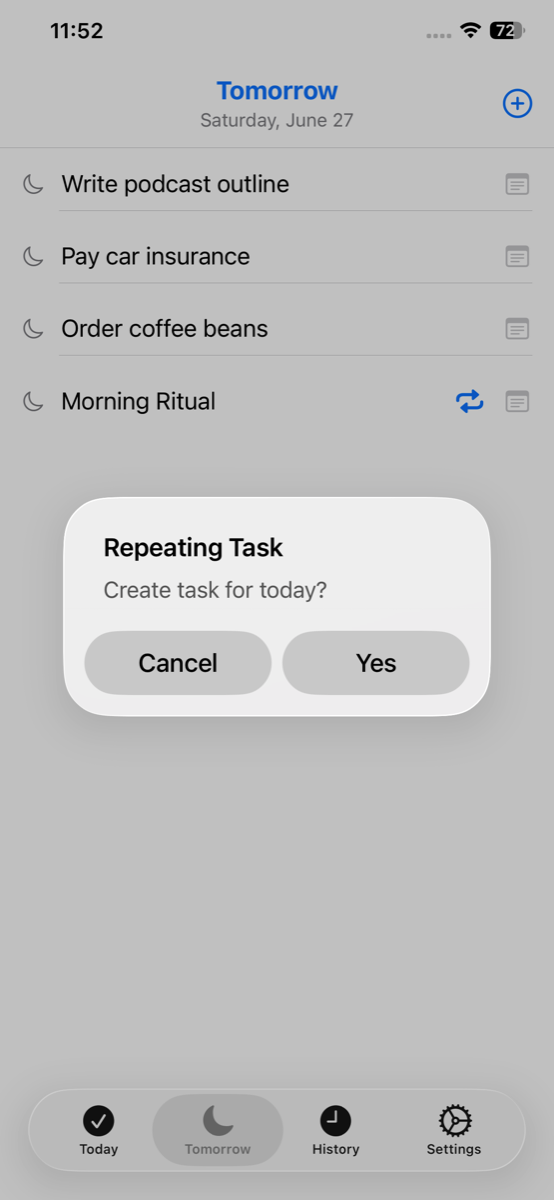
Tomorrow is where plans wait their turn.
Add tasks directly to Tomorrow or postpone them from Today whenever you realise they belong another day.
At the start of each new day, Tomorrow quietly becomes Today, helping you begin each morning with intention rather than yesterday's backlog.
For recurring routines, Tomorrow can also create fresh daily tasks while keeping the original safely in Tomorrow, ready for the next day.
History
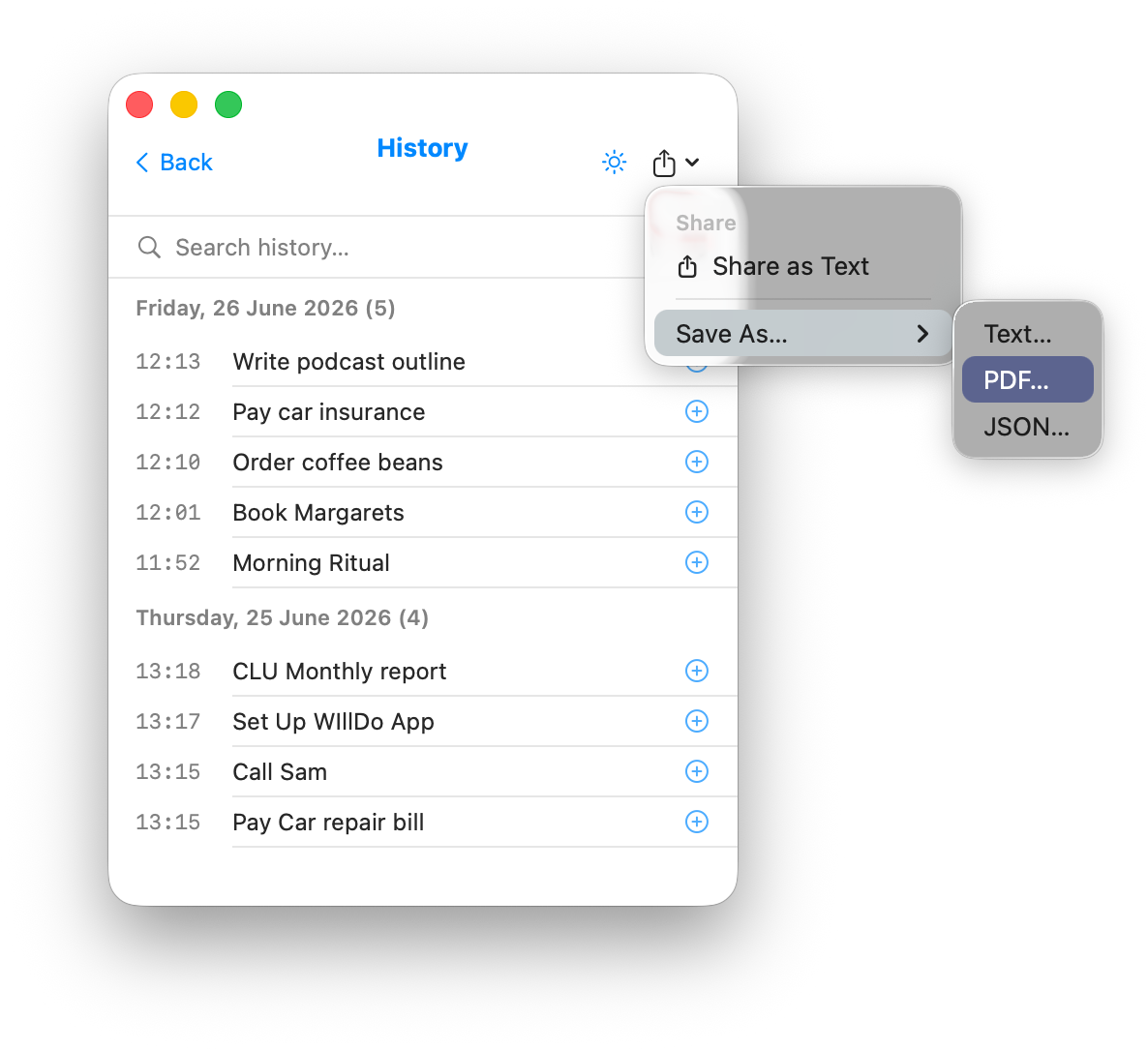
History quietly keeps a record of everything you've completed.
Browse previous days, search months of completed tasks, quickly add useful items back to Today or Tomorrow, and share or save your history whenever you need it.
Whether you're looking for something you did yesterday or six months ago, powerful search helps you find it in seconds.
History isn't simply an archive. It's a reminder of what you've achieved and an easy way to bring recurring tasks back into your day without creating them again.
Mac
WillDo is designed to stay close without taking over your desktop.
Run it from the menu bar, the Dock or both. Open it with a click or a keyboard shortcut, then carry on with your day.
Keep the window on top while you work, have it open in your current Space, or customise the menu bar with task counts and other options to suit the way you like to work.
Desktop widgets and flexible settings help WillDo stay visible when you need it, while remaining quietly out of the way when you don't.
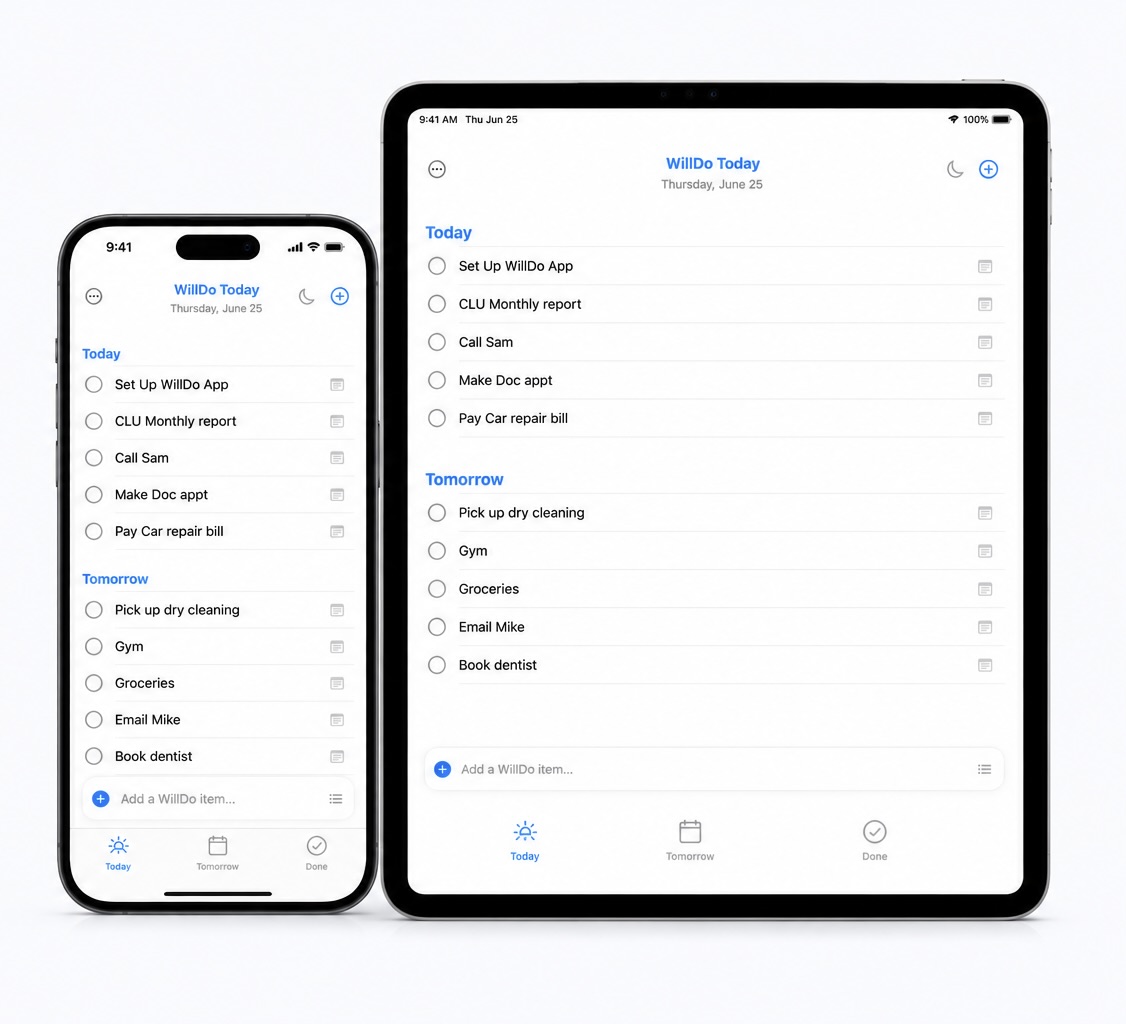
iPhone & iPad
The same Today, Tomorrow and History you know from your Mac, thoughtfully designed for iPhone and iPad.
Swipe to complete, postpone or delete tasks, edit them in place, add notes, and capture new ideas whenever they occur.
Keep Today close with Home Screen widgets, add tasks using Siri or Apple Shortcuts, and customise WillDo with task counts, badges, task age and other settings.
Everything stays in sync through your own iCloud account, so your day is always with you wherever you are.
Apple Watch
Your Today list is always within reach.
See what's left at a glance, then complete tasks, postpone them until Tomorrow or delete them directly from your wrist.
Whether you're walking the dog, making a coffee or between meetings, WillDo is ready whenever you need it, without reaching for your phone.
Changes sync automatically through your iPhone and iCloud, keeping your Mac, iPhone, iPad and Apple Watch working together.
Widgets
Keep Today where you'll naturally see it.
Widgets are available on Mac, iPhone and iPad, making it easy to see what you've chosen to do today without opening the app.
A quick glance is often all it takes to remind yourself what matters next, helping you stay focused without another app competing for your attention.
WillDo's widgets are designed to be quietly present, keeping your day visible while letting you get on with living it.
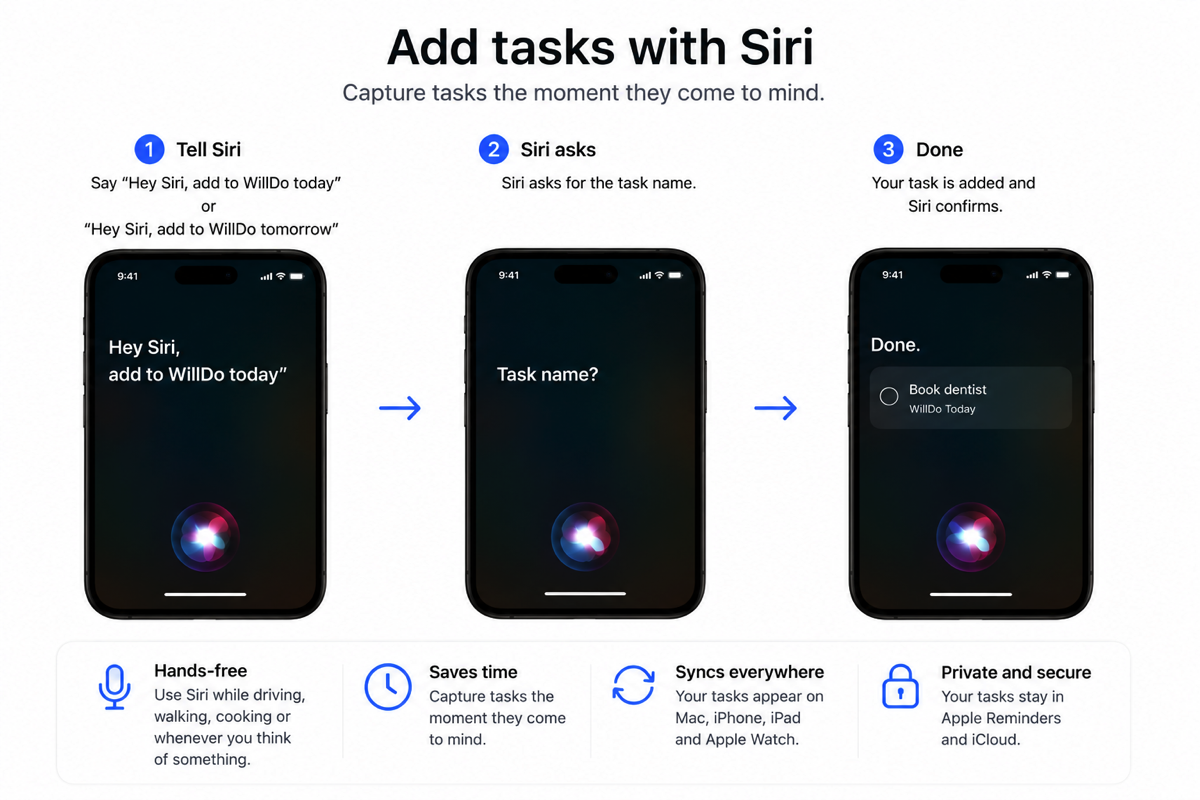
Siri & Shortcuts
Capture tasks whenever they come to mind.
Use Siri, Apple Shortcuts or WillDo's built-in App Intents to add tasks directly to Today or Tomorrow, complete with notes when you need them.
Whether you're driving, walking, cooking or simply thinking out loud, your next task is only a sentence away.
It's one of those features that quietly becomes part of everyday life. The less time you spend managing your list, the more time you spend getting things done.
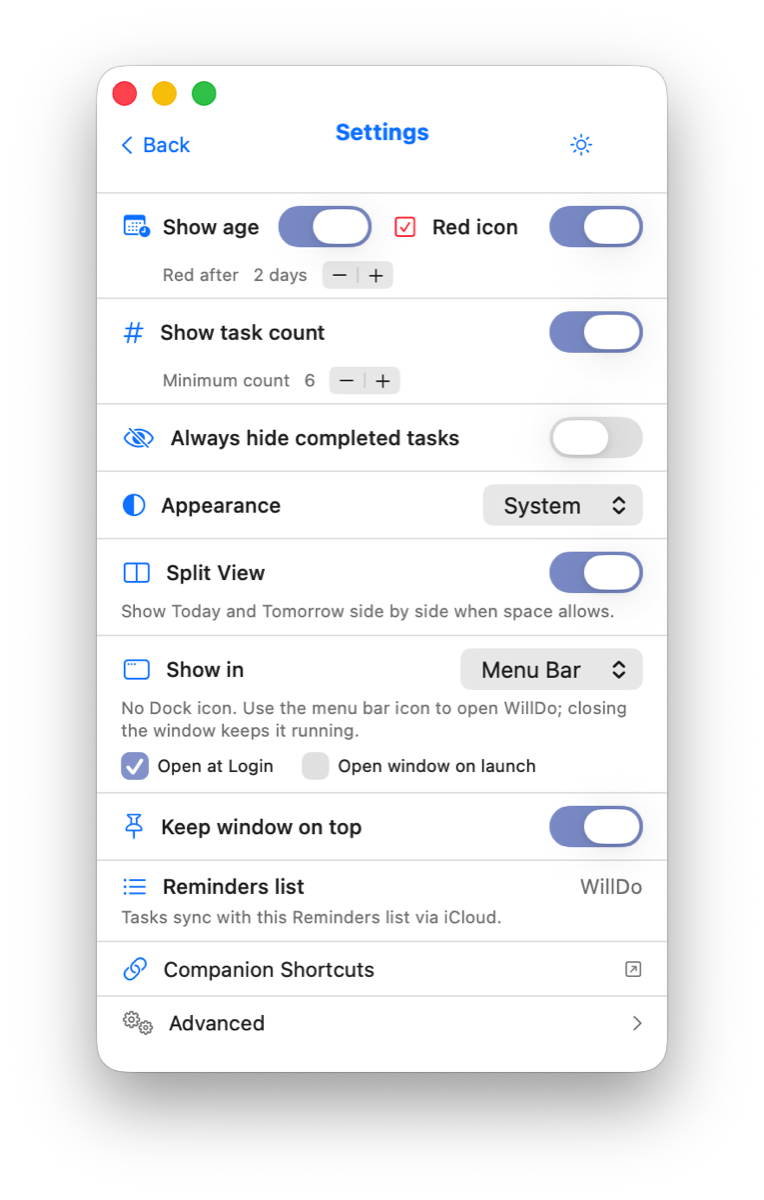
Settings
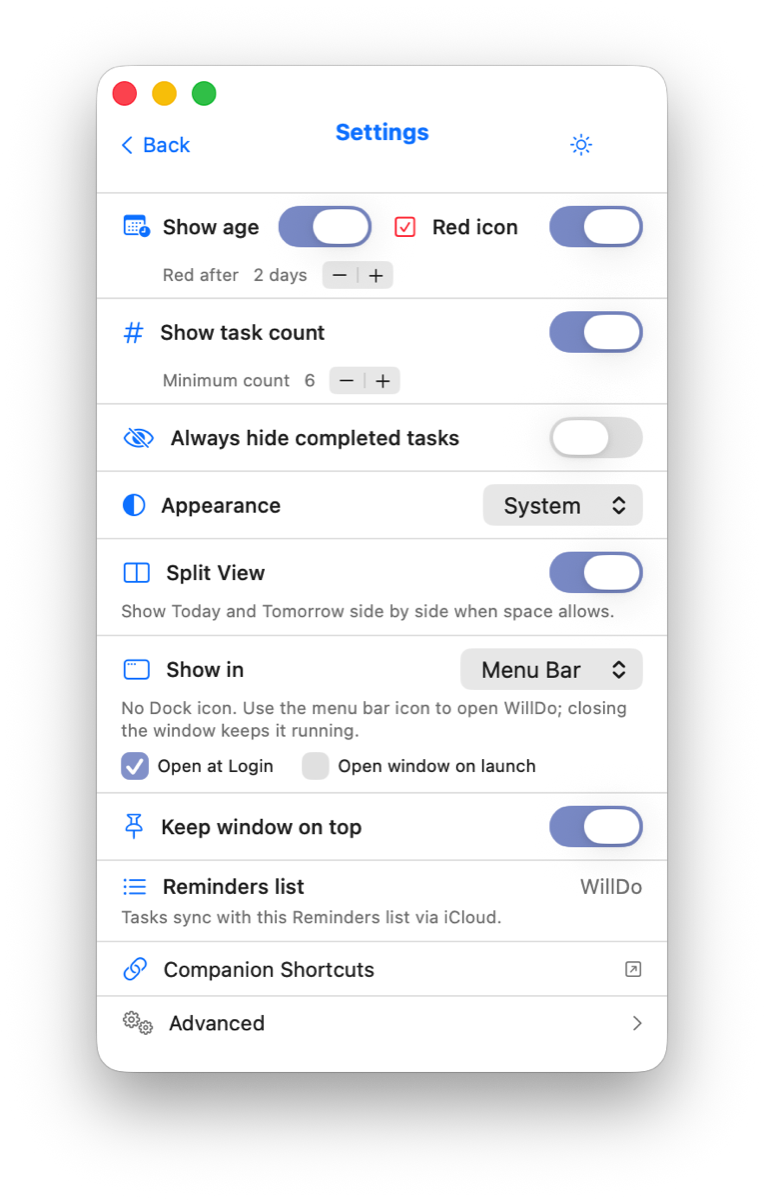
WillDo is deliberately simple, while giving you the flexibility to make it feel at home on your devices.
Choose whether completed tasks remain visible, show task age or task counts, decide when task counts appear, customise badges, and adjust window and display behaviour to suit the way you work.
Whether you prefer the cleanest possible interface or a little more information, WillDo quietly adapts without ever becoming complicated.
The goal isn't to give you endless options. It's to help WillDo fit naturally into your day.
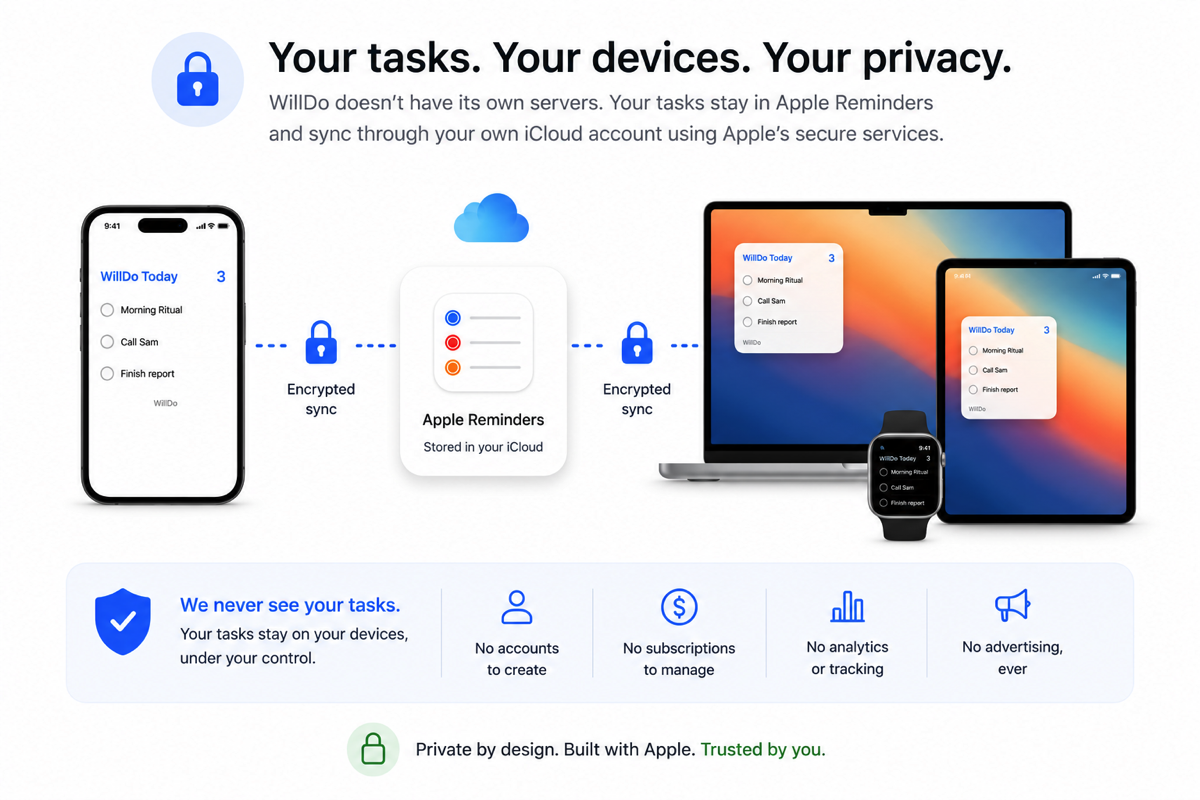
Privacy
Your tasks belong to you.
WillDo doesn't have its own servers because it doesn't need them. Your tasks remain in Apple Reminders and sync through your own iCloud account using Apple's services.
There are no accounts to create, no subscriptions to manage, no analytics, no advertising and no tracking.
The developer of WillDo never sees your tasks. They stay on your devices, under your control.
WillDo Companion Apple Shortcuts
WillDo includes three optional companion Shortcuts, designed to make capturing tasks with Siri easier and more reliable.
WillDo already supports App Intents, so you can build your own Apple Shortcuts using the app's built-in actions. These companion Shortcuts are simply ready-made versions with clear, memorable names that Siri can recognise more easily.
These aren’t just examples of what WillDo can do. They’re designed to give Siri simple, memorable phrases that make capturing tasks quick and reliable.
Each Shortcut does one thing, and does it clearly. Instead of asking Siri to work out which app, action, or list you meant, you can use a simple phrase that points directly to the right action.
"Hey Siri, Add to WillDo Today."
Add to WillDo Tomorrow
Prompts for a task and adds it to Tomorrow, ready for the next day.
Download ShortcutAdd to WillDo with Notes
Prompts for a task and a note, then adds both to Tomorrow.
Download ShortcutWhy companion Shortcuts?
Voice commands work best when the phrase is distinct. During testing, separate Shortcuts with similar names became easier to confuse. Three clear phrases proved to be the sweet spot.
- Add to WillDo Today for something you intend to do today.
- Add to WillDo Tomorrow for something you want to capture without interrupting today's focus.
- Add to WillDo with Notes for an idea that needs a little more context.
Why does “with Notes” add to Tomorrow?
Most note-taking is really capture. You're walking, driving, cooking, or in the middle of something else, and you want to save an idea with enough detail to make sense later. Tomorrow is usually the right place for that.
I also tried adding separate Today and Tomorrow versions with notes. In practice, the names became too similar and the voice experience became less reliable. Keeping one “with Notes” Shortcut makes it easier to remember and easier for Siri to recognise.
If the task needs doing today, open WillDo and move it from Tomorrow to Today with a tap.
Using them with Siri
Once installed, try saying:
- "Hey Siri, Add to WillDo Today."
- "Hey Siri, Add to WillDo Tomorrow."
- "Hey Siri, Add to WillDo with Notes."
Siri will ask what you want to add, then send it to the right place in WillDo.
Setup
Download each Shortcut, open it, then tap Add Shortcut in Apple's Shortcuts app. If you use iCloud for Shortcuts, they should sync across your Mac, iPhone and iPad.
Setting them up on Mac is often easiest: opening a .shortcut file usually takes you straight to the Shortcuts app. On iPhone or iPad, you may need to go through the share sheet first.
These Shortcuts are completely optional. WillDo works beautifully on its own. They are simply there if you like using Siri, Apple Shortcuts, automations or your own personal workflows to capture tasks quickly.

Support
If something isn't working as expected, something feels confusing, or you have an idea that would make WillDo even better, I'd genuinely like to hear from you.
WillDo has grown through conversations with its users, and many of its best features began life as suggestions from people using the app every day.
Whether you've found a bug, have a question, or simply want to share how you're using WillDo, please get in touch.
Email: support@philg.com
Last updated: 18 June 2026
WillDo does not collect, store, or transmit any personal data to its developer or to any third party.
Your tasks stay in Apple Reminders. WillDo reads and writes your to-do items directly in Apple Reminders on your device. Your data syncs across your own devices through your personal iCloud account, managed entirely by Apple under Apple's privacy terms. The developer of WillDo has no access to your tasks, your Reminders, or your iCloud account.
No accounts. WillDo has no login and no user account.
No analytics or tracking. WillDo contains no analytics, advertising, or tracking software, and no third-party SDKs. The app makes no network connections of its own; the only movement of your data is Apple's own iCloud sync of your Reminders.
Permissions. WillDo requests access to Apple Reminders solely to display and manage your lists on your device. You can revoke this at any time in Settings → Privacy & Security → Reminders (iOS) or System Settings → Privacy & Security → Reminders (macOS).
Children. WillDo collects no data and is suitable for all ages.
Changes. If this policy ever changes, the updated version will be posted at this URL with a new "Last updated" date.
Contact. Questions about WillDo or this Privacy Policy? ObscureMyEmail